
Disconnected systems
Agents struggle when business information is spread across ERP, CRM, finance, spreadsheets, emails and operational tools with no reliable integration.
Enable AI / AI Agents
Practical AI agents, Copilot Studio workflows and agentic automation designed around reliable systems, trusted data, clear processes and sensible governance.
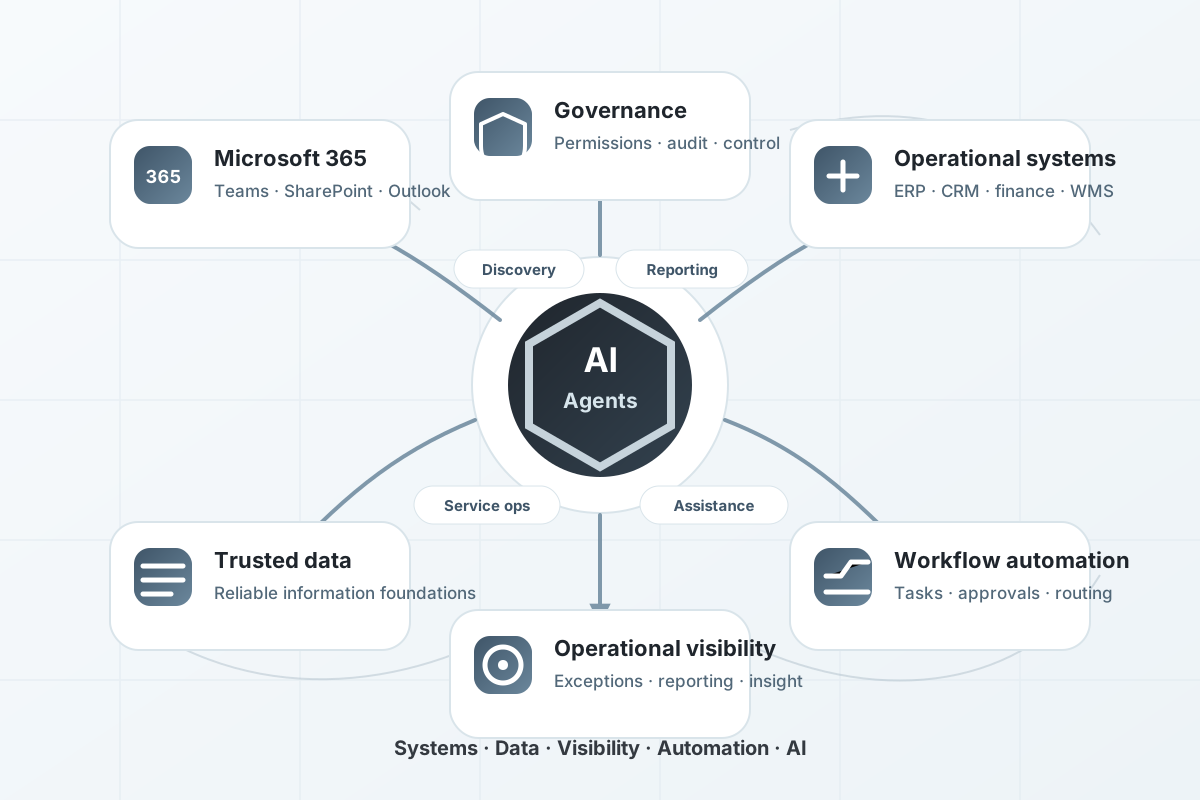
Practical AI agents
Agentic AI can help organisations automate operational work, coordinate tasks across systems and support better decisions. But it only works well when the foundations are in place.
For many businesses, the first practical step will be Microsoft 365 Copilot, Copilot Studio agents, AI readiness work or focused workflow automation rather than a fully bespoke AI platform.
System Software helps UK organisations assess, design and implement practical AI-enabled workflows using senior engineering, sensible guardrails and a clear understanding of business operations.
If you are not sure whether your Microsoft 365 environment, systems, data and workflows are ready, start with an AI readiness assessment or our focused Microsoft Copilot readiness service.
Why AI agents fail
AI agents can only create reliable value when they understand the right information, operate within clear boundaries and support workflows that are already well enough defined to automate.
Agents struggle when business information is spread across ERP, CRM, finance, spreadsheets, emails and operational tools with no reliable integration.
If Microsoft 365 content, SharePoint sites, Teams channels and permissions are not well managed, AI can surface incomplete or inappropriate information.
AI agents need defined inputs, outputs, decisions, exceptions and escalation routes. Vague processes create unreliable automation.
Agentic workflows need monitoring, guardrails and human approval points where operational risk, customer impact or financial decisions are involved.
Where AI creates value
The most successful AI initiatives are usually focused on improving specific operational activities rather than introducing AI everywhere at once. AI creates the greatest value when it reduces friction, improves access to information and supports repeatable decision-making.
Help teams find information across SharePoint, Teams, ERP, CRM, documents and operational systems without manually searching multiple sources.
Explore information discovery →Reduce the effort involved in gathering information, identifying trends and producing management reporting.
Explore unified data →Support repetitive operational tasks with recommendations, approvals, routing and guided decision-making.
Explore workflow automation →Improve how requests, service activity, communications and operational knowledge are handled across the organisation.
Explore job management →The goal is not to deploy AI.
The goal is to improve how work gets done.
Choosing the right route
The right route depends on the operational problem, the systems involved, the level of control required and how far the workflow needs to extend beyond Microsoft 365.
Useful when the main goal is helping people work more effectively with Microsoft 365 content, communication, knowledge and documents.
Microsoft Copilot readiness →Useful for defined internal agents, guided processes, approved connectors and workflows that fit Microsoft 365 and Power Platform patterns.
AI readiness assessment →Useful where the process needs custom interfaces, deeper system integration, specialist logic or more operational structure than standard tools provide.
System integration →AI foundations
Many organisations focus on selecting AI tools before understanding whether the operational environment is ready to support them. Useful AI agents are usually built on a series of connected operational foundations.
Each stage strengthens the next. Organisations with connected systems, trusted information and clear operational workflows are usually able to achieve greater value from Copilot, AI assistants and agentic automation.
Stable platforms that can be supported, secured, integrated and changed.
Systems that share information instead of creating operational silos.
Reliable information with clear ownership, definitions, quality and governance.
A clearer view of what is happening, where work slows down and what should happen next.
Repeatable processes that can be improved, governed, measured and supported.
The permissions, controls, use cases and operating model needed for safe adoption.
AI used to improve information access, decisions, workflows and continuous improvement.
Our approach
We help organisations assess opportunities, improve foundations, build focused AI-enabled workflows and add the controls needed for safe operational use.
Review systems, data, Microsoft 365 readiness, workflows, risks and opportunities to identify where AI agents or automation could be useful.
Improve foundations where needed, including data, integration, workflow design, cloud, permissions, governance and Copilot readiness.
Design and implement focused AI-enabled workflows, Copilot Studio agents, automations, integrations or document-processing tools.
Add monitoring, guardrails, human review points and ongoing support so automation remains reliable, safe and measurable.
Guardrails and oversight
AI agents become risky when they can access, interpret or change information without clear controls, context or accountability.
Define what the agent can access, where it can retrieve information and which systems it can interact with.
Use approval stages where outputs affect customers, finance, compliance, fulfilment or operational decisions.
Track activity, outcomes, exceptions and usage so the organisation can understand what agents are doing.
Review performance, refine prompts and workflows, and extend use cases gradually once value and safety are proven.
Outcomes
The goal is not to deploy AI for its own sake. The goal is to improve how work gets done.
Less time spent searching, checking, summarising, copying, routing and preparing routine operational work.
Requests, exceptions, reports and handovers can be handled more consistently and with less delay.
Teams can access relevant Microsoft 365, process and operational information more easily.
Agents are introduced through scoped pilots, governed workflows and measurable operational use cases.
FAQs
AI agents are digital workers or assistants that operate within governed business systems and Microsoft 365 environments. They can help monitor information, prepare summaries, coordinate workflows and support structured operational tasks.
AI agents can support information discovery, management reporting, request triage, workflow assistance, document processing, exception monitoring, customer service operations and internal knowledge access.
No. AI agents usually work alongside existing systems. They are most useful when connected safely to reliable data, governed Microsoft 365 content, operational workflows and approved business systems.
Most organisations should start by assessing AI readiness, data quality, Microsoft 365 permissions, governance, workflow design and integration options before deploying AI agents into operational work.
AI agents can be used safely when they are scoped carefully, governed by appropriate permissions, monitored, connected to reliable data and designed with human review points where needed.
Explore AI opportunities
A short conversation is enough to understand whether Microsoft Copilot readiness, AI readiness, workflow automation or bespoke agentic AI is the right first step.